Moving off Kajabi
Moving from Kajabi to Course Catalyst
You already built the content and the audience. Moving should not mean starting over. Here is the plan I would follow, what we can import for you, and what you should expect to check by hand.
How it works
What we can move
We have import tooling and hands-on workflows for Kajabi and Kit.
- Contacts, with their tags and email consent handled carefully.
- Landing pages, rebuilt as native Course Catalyst blocks with images saved to your site.
- Kit email sequences, cloned into Course Catalyst sequences.
- Purchase history and enrollments, so existing students keep their access.
What you should plan to check by hand
Course content, styling, links and access need review after the move. Payment subscriptions and platform-specific settings are not promised as automatic transfers. Active subscribers usually need a plan, which we work out together before you switch anything.
Why people make the move
Kajabi's plans start at $179/month and cap products and contacts (per their pricing page, October 30, 2026). Course Catalyst is $27/month on Lite or $97/month on Pro, with unlimited courses and contacts. See the full side-by-side on the Kajabi comparison page. If you rely on Kajabi features we do not have, tell me before you move.
The move, step by step
1. Show us what you have
Send the public page links and a list of your courses, contacts and email sequences to caleb@calebcurry.com. Tell us which parts you use every week and which can stay behind.
2. Agree on the scope
We review the source first, then agree on exactly what gets imported. No surprises, and no promise that everything transfers.
3. Import and rebuild
We import contacts and pages, clone any Kit sequences, and you rebuild or paste course lessons. Imports are safe to run again, so a second pass will not duplicate people.
4. Test as a student and as a buyer
Log in as a student, buy something with a test card, and read the emails. Check forms, access and email consent before anything changes for your audience.
5. Cut over, then cancel
Point your domain (Pro) and tell your list. Keep Kajabi running until you are happy, then cancel it. Do not cancel first.
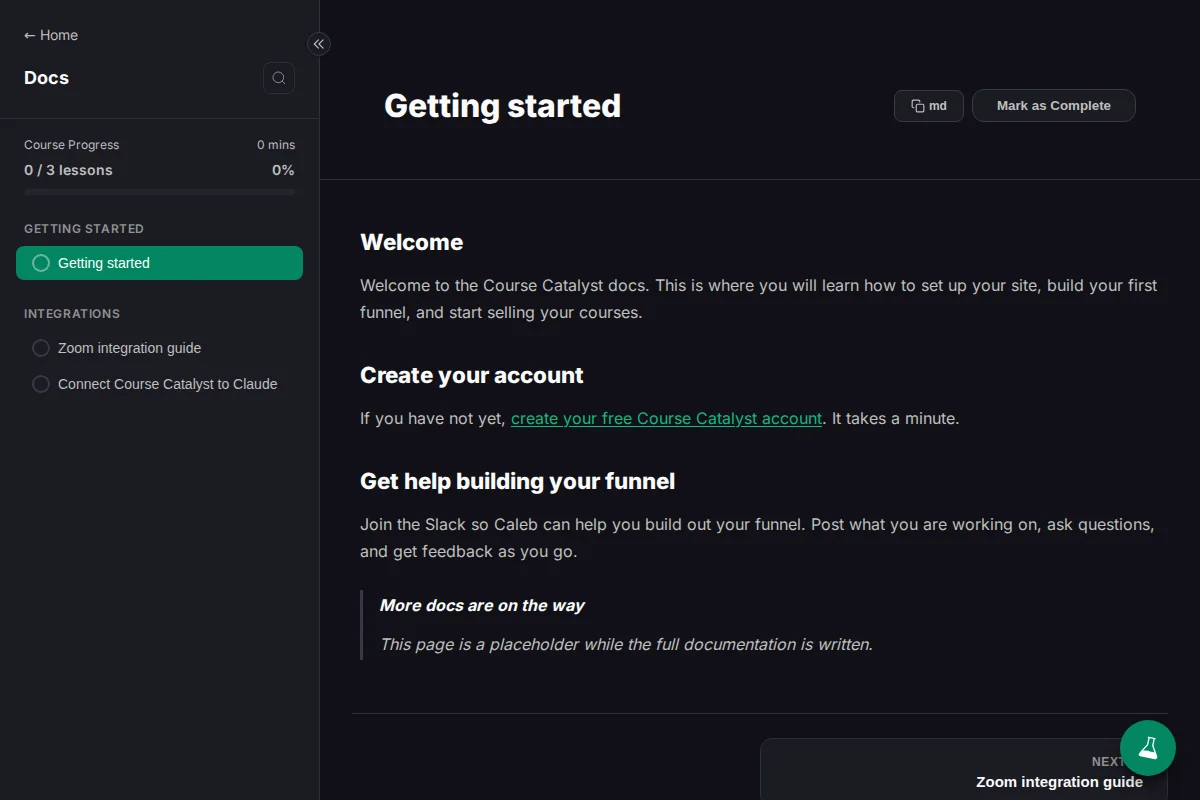
See the actual course player
Our public docs run on Course Catalyst. This is the published docs course, captured from the product.
What Course Catalyst costs
Lite: $27/month
Or $270/year, billed annually. 10% platform fee on sales. Payment processing fees are separate.
Everything you need to launch and sell your first course.
Pro: $97/month
Or $970/year, billed annually. 0% platform fee on sales. Payment processing fees are separate.
For creators who sell and email at scale.
Questions before you choose
Do you offer Kajabi migration help?
We help import from Kajabi and Kit. Email caleb@calebcurry.com with what you want to move. We will review your courses, pages, contacts and emails with you and agree on the scope before starting. This is hands-on help, not a promise that every setting or subscription transfers automatically.
Can I bring my Kit audience and emails?
We can help import Kit contacts and email sequences. We review the source and email consent with you before importing.
Should I cancel Kajabi first?
No. Review and test the new site, access and billing setup first. Agree on a cutover with us before you cancel anything.
Will my students keep their access?
We can import purchase history and enrollments so existing students keep access. We check this with you in the scope step, and recurring subscriptions need their own plan.